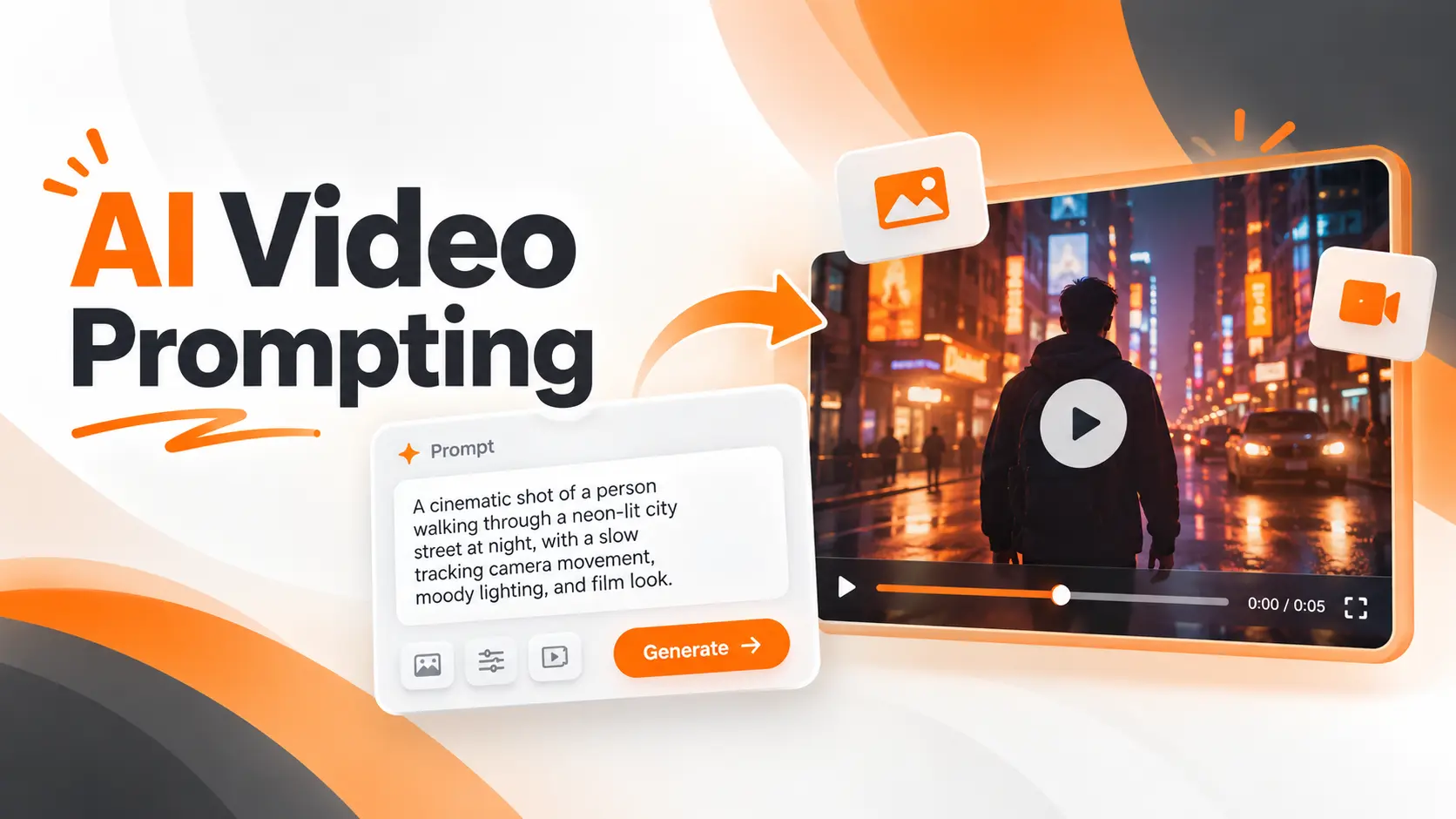
AI video prompting is the process of describing a scene, its movement, and its visual direction so a generative video model can create the intended footage. A useful prompt tells the model what appears on screen, what happens during the shot, and how the camera should move. The difference between a vague instruction and a well written one becomes clear when the generated video starts moving in an unexpected direction.
For creators working with AI Video Generation, learning to write effective prompts means gaining more control over the final result. The goal is not to write the longest description. It is to communicate a specific visual idea using instructions the model can translate into a moving scene.
AI Video Prompt Structure
A practical AI video prompt combines five elements: subject, action, setting, camera direction, and visual atmosphere. Audio instructions can be added when the selected model supports sound generation.
I would start with a simple structure:
Subject + Action + Setting + Camera Movement + Lighting and Style
Each element has a specific purpose. The subject identifies what viewers should focus on, while the action determines what happens during the clip. The setting establishes the environment, and the camera direction controls how the viewer experiences the scene.
Consider this example:
"A ceramic coffee cup sits on a wooden table beside a large window. Steam rises slowly from the coffee as the camera moves closer. Warm morning sunlight fills the room, creating a calm cinematic atmosphere."
This prompt gives the model a defined subject, one primary movement, a clear environment, and a visual style.
It does not require complicated technical language. The scene is understandable because each sentence contributes information the video needs.
For short clips, I prefer one central action and one clear camera movement. A focused instruction provides a stronger starting point than a paragraph containing several unrelated events.
Writing Effective AI Video Prompts
Writing an AI video prompt becomes easier when the creative idea is separated into visual decisions.
Rather than describing everything at once, I would build the instruction in stages, starting with the most important element of the scene.
Define the Main Subject
Begin with the person, product, object, or environment that should receive the viewer's attention.
Instead of writing "a person in an office," describe the visible characteristics that matter:
"A product designer wearing a dark gray shirt sits at a desk in a modern workspace."
This establishes a more specific visual identity and environment.
If the video is based on an existing image, the model already receives appearance information from that reference. The prompt can then focus on what changes during the shot.
Describe One Clear Action
Action gives the video its purpose.
A description such as "the person is working" leaves the model to interpret what that activity looks like.
A more useful instruction would be:
"The designer reaches toward the tablet and begins sketching a product interface."
The movement is visible and belongs to a single continuous action.
For a short shot, I would avoid combining unrelated events such as walking across a room, opening a door, using a computer, and speaking to another person. Those actions are better planned as separate shots.
Establish Camera Direction
Camera movement determines how the audience views the action.
A stationary camera creates a different impression from a camera that follows a moving subject.
For a product advertisement, a slow camera movement toward the object can direct attention to its details. For an outdoor scene, a wider camera movement can reveal the surrounding environment.
The prompt should identify the intended movement instead of leaving the model to choose one.
Add Lighting and Visual Style
Lighting and style establish the visual character of the video.
Descriptions such as soft daylight, dramatic side lighting, documentary realism, or flat illustration provide useful direction.
However, I would only include details that contribute to the intended result.
For a product demonstration, realistic lighting and clear product visibility matter more than adding several unrelated cinematic effects.
Specify Sound When Supported
Some video models can generate sound effects, ambience, and dialogue alongside the visuals.
For these models, a prompt can include environmental audio:
"Soft rain falls against the window, with distant traffic sounds outside."
Dialogue requires greater precision. The speaker, spoken words, and surrounding audio should be clearly identified.
When the selected model does not support native audio generation, sound must be added through a separate production process.
AI Video Prompt Examples
The most useful AI video prompts describe scenes that can be understood and produced as individual shots.
These examples are written as starting instructions that can be adapted to supported video models. They are illustrative prompts, not claims of tested output.
Cinematic Video Prompt
"A wide shot of a mountain road at sunrise. A black car moves slowly along the winding road while the camera tracks beside it. Golden sunlight illuminates the mountains, and a thin layer of mist covers the valley."
This prompt defines the subject, direction of movement, camera behavior, and atmosphere.
The camera follows one moving object, while the environment provides visual depth.
Product Advertisement Prompt
"A premium smartwatch rests on a dark stone surface. The camera slowly moves closer to the watch face while soft studio reflections travel across the glass. The watch remains stationary under controlled lighting."
The watch is the focus, and the primary action comes from the camera.
For an actual product campaign, I would provide an approved product image as a reference and verify that the generated clip preserves the design.
Exact logos, text, and product specifications should be handled using verified creative assets when accuracy is essential.
Social Media Video Prompt
"A colorful sneaker stands on a clean orange platform. The camera moves in a smooth arc around the shoe as soft shadows shift across the surface. Bright studio lighting creates an energetic advertising style."
This prompt is designed around a visually recognizable product and a single camera movement.
The composition can be prepared for a vertical video by selecting the appropriate aspect ratio in the generation interface.
Educational Video Prompt
"A clean three dimensional model of the solar system appears against a dark background. The camera slowly moves toward Earth as the planet rotates on its axis. Soft directional lighting reveals the planet's surface."
This works as a visual illustration for educational content.
The generated footage should not be treated as scientific evidence. If exact planetary positions, dimensions, or timing matter, those details must be supplied through verified educational graphics.
Animated Illustration Prompt
"A flat illustration of a modern city street comes to life. Small cars move slowly along the road while the camera remains stationary. Windows illuminate one after another, preserving the original illustration style and color palette."
The instruction identifies which elements move while asking the model to preserve the visual direction of the artwork.
For illustrated scenes, maintaining the original style matters as much as creating convincing motion.
Camera Movement and Motion Prompts
Camera instructions have a direct impact on how AI generated footage feels.
Two prompts describing the same object can produce very different visual results when the camera movement changes.
Static and Tracking Shots
A static shot keeps the camera in one position while objects move within the frame.
For example:
"A stationary camera frames a busy coffee shop counter. A barista places a cup of coffee on the table as steam rises."
This allows the viewer to focus on the subject's action.
A tracking shot follows a moving subject:
"The camera tracks beside a cyclist traveling along a forest path, maintaining a consistent distance as trees pass in the background."
Tracking movement is useful when the subject needs to remain visible throughout the action.
Dolly, Pan, and Tilt Movements
A dolly movement changes the camera's physical position toward or away from the subject.
"The camera slowly moves forward toward a glass sculpture, revealing the reflections across its surface."
A pan rotates the camera horizontally:
"The camera pans from left to right across a modern office, revealing desks and large windows."
A tilt rotates the camera vertically:
"The camera tilts upward from the entrance of a skyscraper to its illuminated upper floors."
These instructions are more specific than asking the model to make a video look cinematic.
They describe how the shot should change over time.
Motion Speed and Timing
Movement speed also affects the result.
A rapid camera movement can communicate energy, while a slow movement gives viewers time to examine details.
I would describe speed using clear phrases such as "moves slowly," "follows at a steady pace," or "accelerates toward the subject."
Timing should match the supported clip duration.
A five second shot has limited room for complex action. When the concept requires several distinct events, separating them into individual shots provides a clearer production structure.
Text to Video and Image to Video Prompts
The starting material changes how an AI video prompt should be written.
A text to video model needs descriptions of the subject, environment, visual style, and movement because the scene begins with written instructions.
An image to video workflow already has a visual reference. The uploaded image establishes much of the appearance, so the prompt can focus on movement and changes over time.
Consider a product photograph showing a perfume bottle on a white platform.
For text to video, the instruction might be:
"A transparent perfume bottle with a silver cap stands on a white platform in a luxury studio. Soft lighting highlights the glass as the camera moves closer."
For image to video, after uploading the photograph, the instruction can be shorter:
"The camera slowly moves closer to the bottle while soft reflections shift across the glass. The bottle remains stationary."
The second prompt does not need to describe details that are already visible in the uploaded image.
This distinction is particularly important when creating video from approved product photographs, illustrations, or existing brand assets.
AI Video Prompting for Runway, Kling, and Veo
Video generators interpret prompts through different models and production controls. A useful instruction should therefore match the selected workflow rather than relying on one universal formula.
Runway emphasizes clear descriptions of visual content and motion. Its image to video guidance places particular importance on describing what moves, how the camera behaves, and how the action progresses.
For Runway, I would begin with a direct movement instruction and add visual detail only when the result requires clarification.
Kling AI provides guidance built around the subject, action, environment, camera language, and atmosphere. Its video workflows also include camera and reference controls, depending on the selected model.
For a Kling scene, I would describe the primary action and the intended camera behavior before adding secondary visual effects.
Google Veo supports detailed descriptions of shot composition, movement, lighting, visual style, and, in supported models, dialogue and environmental sound.
For a scene with spoken dialogue, I would identify the speaker and the exact words while keeping the surrounding action simple enough for the clip.
Adobe Firefly allows creators to combine text instructions with model settings and supported visual controls. It also offers prompt enhancement and editing features that vary by selected model.
For a Firefly project, I would check which settings are controlled directly through the interface before adding the same instructions to the text prompt.
The practical lesson is that model settings and prompt wording should work together.
A camera movement chosen through a dedicated control should not conflict with a different movement described in the prompt.
Improving AI Video Prompt Results
A generated clip provides evidence of how the model interpreted the instruction.
When the result differs from the intended scene, I would identify the specific problem before rewriting the prompt.
Changing every part of the instruction at once makes it harder to understand which revision improved the output.
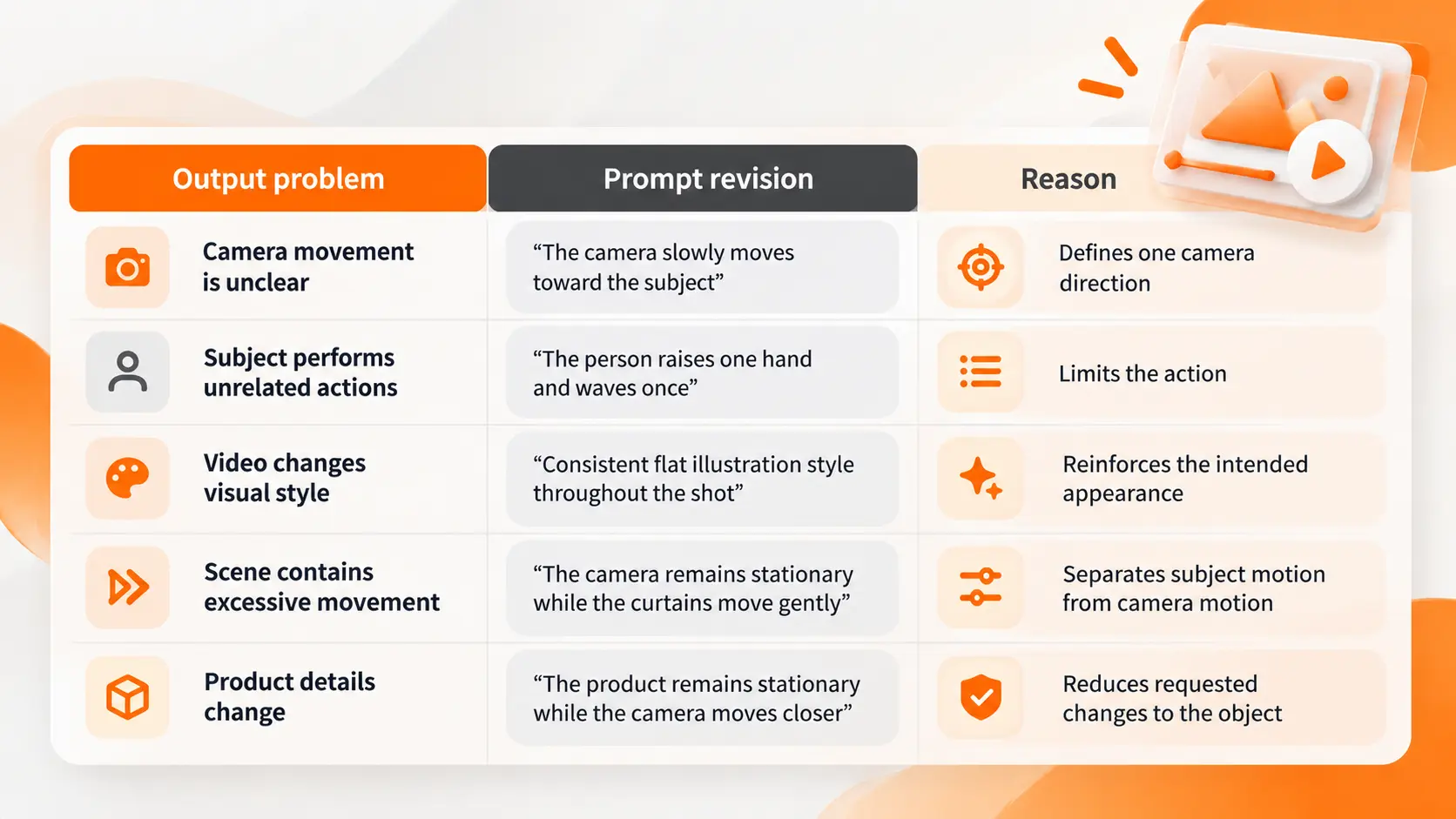
A simple example demonstrates the difference.
Initial prompt:
"A cinematic video of a futuristic office."
This establishes a broad visual concept but leaves the action and camera behavior undefined.
Revised prompt:
"A wide shot of a futuristic office with glass walls and illuminated workstations. The camera slowly moves forward toward the central desk while soft blue light reflects across the floor."
The revised instruction defines what the camera sees and how the scene develops.
I would generate the revised version using the same model and settings, then examine whether the additional details produced the intended change.
This comparison is more informative than changing the model, prompt, duration, and visual style simultaneously.
AI Video Prompt Templates for Real Projects
A prompt template is useful when a team produces several videos with similar visual requirements.
For a startup preparing product advertisements, I would establish a consistent format that separates the product description from the scene movement.
A reusable structure could read:
"A [shot type] of [subject] in [environment]. The subject [primary action] while the camera [movement]. [Lighting description] creates a [visual mood] atmosphere."
For example:
"A close shot of a wireless speaker on a wooden shelf. The speaker remains stationary while the camera moves slowly from left to right. Warm studio lighting creates a refined product photography atmosphere."
The same structure can be adapted for other products without rewriting the entire creative direction.
For a multi scene campaign, each shot should have its own prompt. The overall campaign can share reference images, approved visual descriptions, and a consistent style.
I would keep the original prompts, revised versions, model settings, and selected outputs together in the project's production records.
This makes it easier for another team member to understand how the final footage was created and which instructions should be reused.
Limits of AI Video Prompt Control
A detailed prompt improves the clarity of the instruction, but it does not guarantee exact visual results.
Video models generate new information based on their training and the supplied inputs. They can produce unexpected camera movement, altered object details, inconsistent motion, or text that does not match the requested wording.
For a product advertisement, a generated package label cannot replace verified branding.
The model can also create details that were not present in the original scene, particularly when movement reveals previously unseen areas.
Another limitation is the difference between a requested action and a physically accurate action.
A scene can look convincing while containing unrealistic movement or object interactions.
When visual accuracy matters, the finished video must be reviewed frame by frame or against the relevant production requirements.
Prompting should be treated as a way to guide generation, not as a guarantee that every instruction will be followed exactly.
Final Thoughts
AI video prompting is a practical skill built around clear visual communication.
A strong prompt establishes what the viewer sees, what changes during the shot, and how the camera presents the action. The best starting point is a focused scene with one primary movement and enough visual detail to communicate the intended style.
For creators and product teams, the value comes from turning broad ideas into instructions that can be tested and refined.
The first generation reveals how the model interpreted the scene. The next revision should address a specific difference between that output and the intended result.
That process produces more useful information than simply making every prompt longer.
FAQ
Can I write AI video prompts in my own language?
Yes, if the selected model supports that language. Prompt interpretation quality depends on the model and language. For important production work, compare the output with an equivalent English instruction and confirm that the intended meaning has been preserved.
Can I get another AI tool to write my video prompt for me?
Yes. Language models and dedicated prompt assistants can turn a rough creative idea into a structured video prompt. The resulting instructions should still be reviewed for conflicting actions, unnecessary details, and compatibility with the selected video model.
Can I get the exact same video again with the same prompt?
An identical prompt does not guarantee an identical video. Some platforms support random seed controls that help reproduce similar results when model versions and settings remain consistent. Preserve the approved video file rather than relying on regeneration.
Can I change just one part of an AI video without generating everything again?
Some video platforms support targeted editing, masking, or reference based modifications. The available controls depend on the model and editor. Changes to one element can still affect surrounding content, so the updated video requires review.
Can I use a real person's name or face in an AI video prompt?
The ability to generate a recognizable person does not establish permission to use their likeness. Consent, privacy rights, publicity rights, platform policies, and the intended commercial use must be considered. Obtain appropriate authorization before using another person's identity in promotional content.
Fatemeh Jahangard
Technology & AI Writer at PinerookFatemeh Jahangard covers AI, emerging technologies, and digital innovation for Pinerook, focusing on how technology shapes startups and industries.
 Seen first.