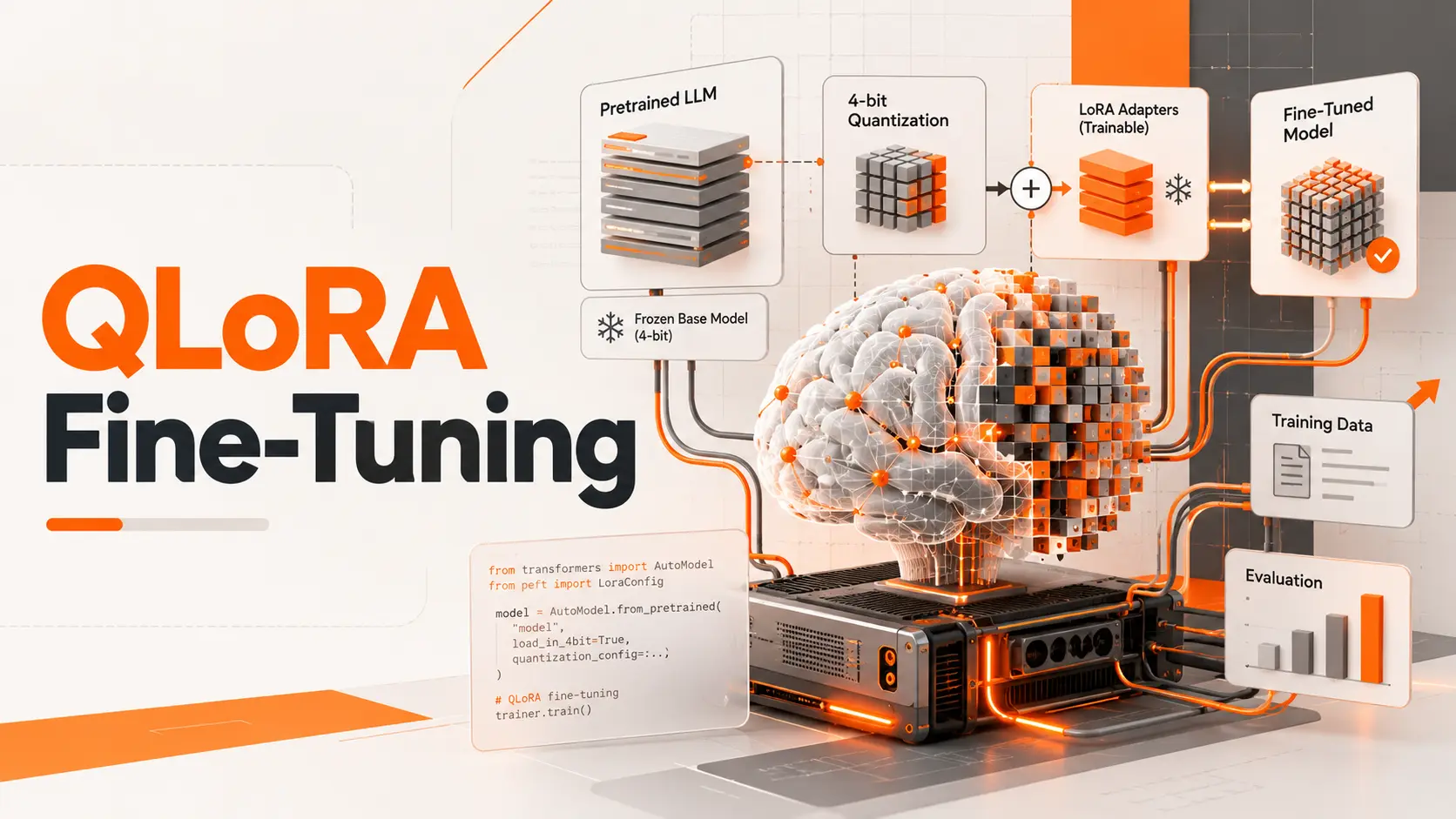
Fine-tuning a large language model doesn't have to mean updating billions of parameters. QLoRA reduces GPU memory requirements by loading the pretrained model in 4-bit precision and training smaller LoRA adapters instead. That makes adapting an existing LLM more accessible without retraining the entire model.
The part I find most important in AI Model Fine-Tuning is choosing a training setup that fits the available hardware and produces a measurable improvement. For QLoRA, that means selecting the right model, preparing consistent examples, configuring quantization correctly, and testing the result against the original model. Lower memory usage makes the training possible; good data and evaluation make it worthwhile.
QLoRA Fine-Tuning Workflow
I would start with a small instruction-tuned model and one clearly defined task rather than attempting to adapt a large model immediately.
For a practical example, consider Qwen2.5-1.5B-Instruct, an instruction-following model with approximately 1.5 billion parameters. Its smaller size makes it suitable for learning the QLoRA workflow before moving to larger architectures.
The process follows seven steps:
Select the base model. Choose a model that supports the intended task, licensing requirements, and training environment.
Prepare the dataset. Organize examples into consistent instructions and expected responses, with separate training and evaluation data.
Load the model in 4-bit precision. Configure NF4 quantization and the computation precision supported by the GPU.
Attach LoRA adapters. Define which model layers receive trainable parameters and how those adapters are configured.
Run supervised fine-tuning. Train the adapters while monitoring loss, memory consumption, and evaluation results.
Evaluate the adapted model. Compare its outputs with those of the original model using the same unseen requests.
Save the adapter. Preserve the trained weights and configuration so they can be loaded alongside the correct base model.
I would use the Hugging Face ecosystem for this workflow: Transformers for loading the model, bitsandbytes for quantization, PEFT for adapters, and TRL for supervised fine-tuning. Datasets and Accelerate provide the supporting data and execution functionality.
These components give us control over the training process without requiring full-parameter fine-tuning.
Four-Bit Quantization and LoRA Adapters
QLoRA combines two techniques that solve different problems.
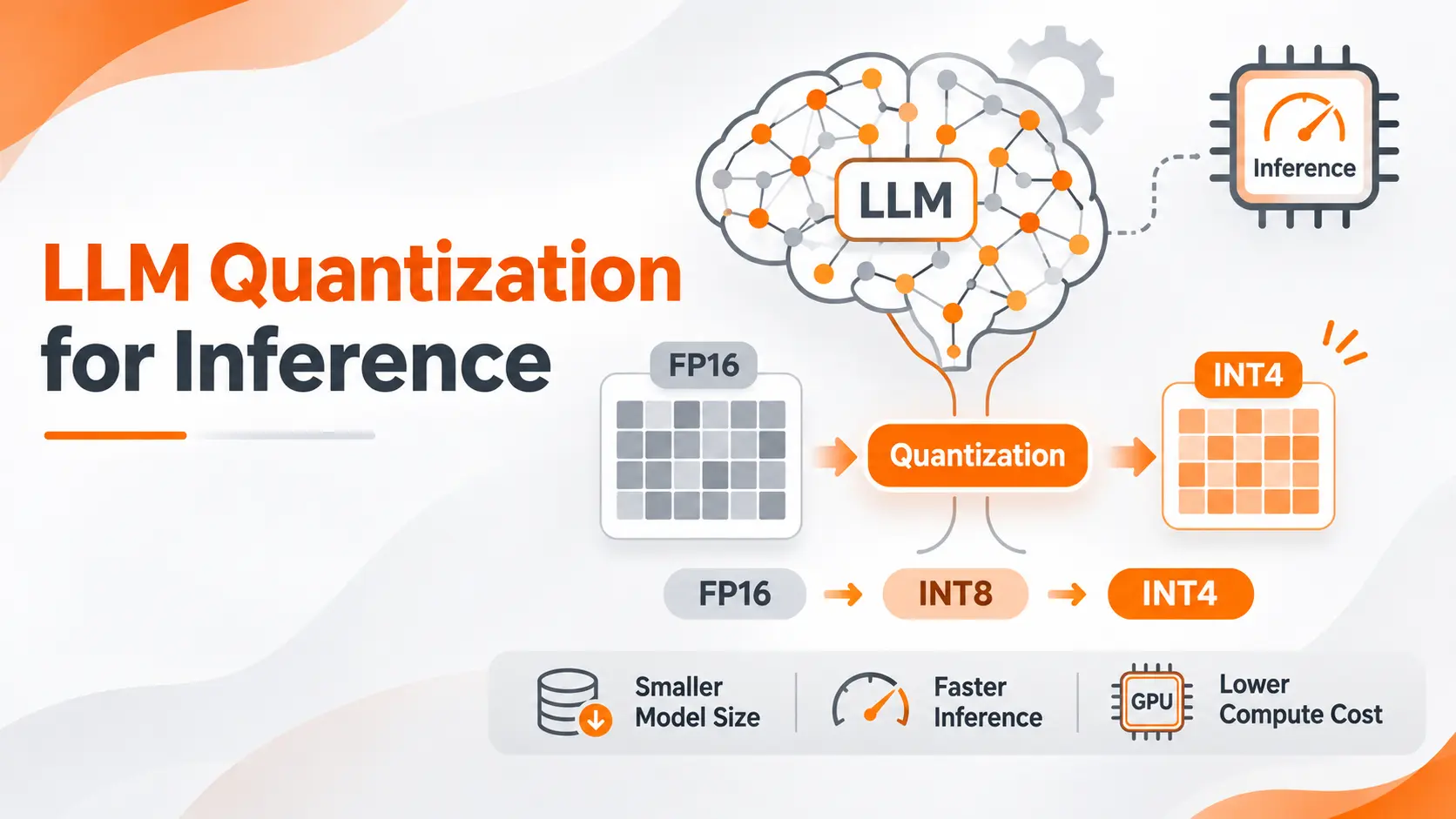
The first is 4-bit quantization, which reduces the memory required to store the pretrained model's weights. Instead of holding those weights in a higher-precision representation, the training setup loads them in a compressed format.
The second is Low-Rank Adaptation (LoRA), which adds small trainable matrices to selected model layers.
During QLoRA training, the quantized base model remains frozen. Gradients pass through it, but the optimizer updates the adapter parameters rather than the original model weights.
This distinction explains why QLoRA reduces memory consumption without eliminating gradient-based training.
NF4 and Double Quantization
NormalFloat 4, or NF4, is a 4-bit format designed for the statistical distribution of neural network weights.
In the Hugging Face bitsandbytes configuration, NF4 is selected through bnb_4bit_quant_type.
Double quantization adds another layer of memory reduction by compressing the constants used during quantization. The QLoRA research introduced this approach to reduce the storage overhead associated with quantization itself.
Compute precision is separate from weight storage. A model can store its frozen weights in 4-bit precision while performing supported training computations in BF16.
I would use BF16 when the GPU supports it, rather than assuming that loading a 4-bit model means every calculation runs in four bits.
Model Selection and GPU Requirements
The first hardware decision is the size of the base model.
A smaller model needs less memory for its frozen weights, but training also consumes memory for activations, adapters, gradients, and optimizer states.
That is why parameter count alone cannot determine whether a QLoRA training run will fit on a GPU.
I would check four factors before choosing the model:
Model size: The number of parameters and the architecture determine the starting memory footprint.
Sequence length: Longer token sequences increase activation memory requirements.
Micro-batch size: More examples processed together consume additional memory.
Training configuration: Adapter targets, gradient checkpointing, precision, and optimizer choices influence peak VRAM.
For the Qwen2.5-1.5B-Instruct example, a supported NVIDIA GPU with 16 GB of VRAM provides a practical starting environment for a short-sequence experiment. This is a planning configuration, not a guaranteed minimum or a measured benchmark for the example in this article.
The actual memory requirement must be checked with the selected software versions and training settings.
VRAM Planning
QLoRA reduces the model-weight footprint, but it does not make activation memory disappear.
I would begin with a sequence length of 512 tokens and a micro-batch size of one. These settings limit the initial workload while keeping the process straightforward to inspect.
If the run exceeds available GPU memory, I would reduce sequence length first when the task permits it, then review micro-batch size, gradient checkpointing, and adapter configuration.
Gradient accumulation allows several small batches to contribute to an optimizer update without holding all examples in GPU memory simultaneously. It does not remove the memory required for an individual sequence.
For larger models, I would verify the complete configuration against available VRAM before committing to a long training run.
Preparing the Training Dataset
A fine-tuned model learns from the examples it receives. The dataset must therefore demonstrate the exact behavior expected after training.
Consider DeskFlow, a fictional SaaS platform that wants to classify incoming support requests.
The model needs to assign one of four categories:
Billing, Cancellation, Technical Support, or Other.
A training example could contain the customer request:
"I was charged twice for my subscription this month."
The expected assistant response would be:
Billing
Another example might contain:
"Please end my subscription when my current plan expires."
The expected response would be:
Cancellation
This is a narrow, measurable task. The model doesn't need to produce an elaborate explanation; it needs to return the correct category.
Consistent Input Formatting
For an instruction-tuned model, I would preserve its supported conversation format and tokenizer.
The dataset can use structured user and assistant messages or a compatible prompt-completion format.
Each example should provide a clear instruction, the customer request, and the expected assistant response. Labels should remain consistent across the dataset.
A request about a failed payment should not be classified as Billing in one example and Technical Support in another unless the business has explicitly defined different conditions.
Inconsistent examples introduce contradictory supervision.
Training and Evaluation Splits
Before training, I would separate examples into training, validation, and final test sets.
The training set updates the adapter. Validation examples help select settings and monitor training. The final test set measures performance after the configuration has been selected.
For DeskFlow, I would keep paraphrased duplicates and closely related customer cases together when splitting the data. Otherwise, nearly identical requests could appear in training and testing, making the measured result misleading.
The test data should also include ambiguous requests, incomplete information, and cases outside the four intended categories.
The goal is to measure whether the adapted model handles new requests correctly, not whether it remembers the training examples.
QLoRA Training Configuration
The configuration determines how the quantized model is loaded, which weights are trained, and how training progresses.
For the Qwen2.5-1.5B-Instruct example, I would begin with the following experimental settings.
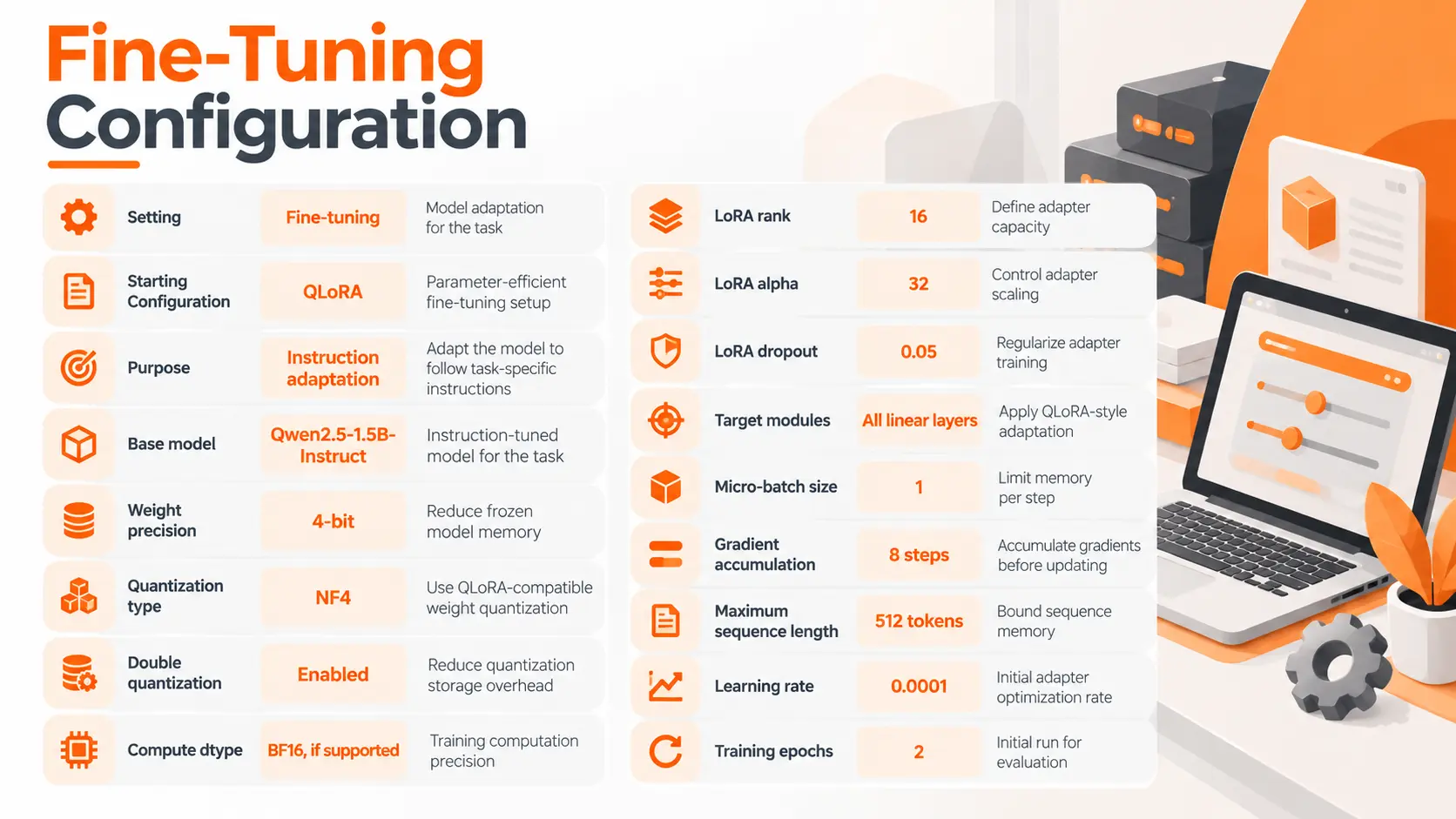
These values are starting parameters for a small experiment. They are not universal optimums, and the table does not represent a completed benchmark.
Quantization Configuration
Hugging Face exposes the relevant settings through BitsAndBytesConfig.
For this setup, I would enable load_in_4bit, choose nf4, and activate bnb_4bit_use_double_quant.
The compute dtype should match supported hardware capabilities.
The model must also be prepared for k-bit training when following the corresponding PEFT workflow.
LoRA Configuration
The adapter settings are defined through LoraConfig.
Rank controls the size of the low-rank matrices. Alpha controls their scaling, while dropout provides regularization.
Hugging Face supports target_modules="all-linear" for QLoRA-style adaptation, allowing adapters to be applied across the model's linear layers.
I would begin with rank 16 rather than increasing adapter capacity before establishing a reliable baseline.
A larger rank increases the number of trainable parameters. Its value should be justified by evaluation results, not by the assumption that more trainable weights automatically produce better answers.
Running QLoRA Fine-Tuning
Once the environment, model, dataset, and configuration are ready, the training run can begin.
I would use TRL's SFTTrainer with the quantization and PEFT configurations, making sure the trainer receives both the training and evaluation datasets.
The exact supported arguments depend on the installed TRL version, so the library versions and model revision should be recorded with the experiment.
Assistant Response Loss
For DeskFlow's classification task, the model should learn to generate the correct category, not reproduce the customer's request.
With a prompt-completion dataset, TRL can calculate loss on the completion rather than the input prompt.
For a conversational dataset, assistant_only_loss=True can restrict loss calculation to assistant responses when the chat template supports the required assistant-token mask.
I would verify this behavior before starting a full run. Incorrect loss masking changes what the model is being trained to predict.
Training Progress
I would monitor training loss, validation loss, GPU memory usage, and the number of completed optimizer updates.
Training loss shows how well the model is fitting examples used for learning. Validation loss provides evidence about performance on separate examples.
Neither metric alone establishes that the final business task has improved.
If training loss keeps decreasing while validation performance deteriorates, I would stop and inspect overfitting before increasing the number of epochs.
The initial two-epoch configuration should be treated as a controlled experiment, with the final checkpoint selected using validation evidence.
Evaluating the Fine-Tuned Model
The most important comparison happens after training.
I would evaluate the original base model and the QLoRA-adapted model on the same held-out customer requests, using the same prompt format and decoding settings.
For DeskFlow, the primary metric would be classification accuracy.
Accuracy = Correctly classified requests ÷ Total evaluated requests
However, accuracy alone can hide poor performance on smaller categories.
If Billing represents most of the requests, the model could achieve a respectable overall score while mishandling cancellation requests.
I would examine precision, recall, and F1 score for each category, alongside a confusion matrix showing which classes are being mixed up.
Model Behavior Beyond the Training Examples
The evaluation should include requests with wording that differs from the training data.
For example:
"I don't want my plan to renew next month."
The model should classify this as Cancellation when that matches DeskFlow's category policy.
I would also test a request that contains more than one issue:
"My invoice is wrong, and I can't access my account."
The expected behavior needs to be defined before evaluating the model. The task could require a primary category, a multi-label result, or an escalation flag.
Without that rule, an apparently incorrect prediction could reflect an ambiguous evaluation target rather than a training failure.
Evidence of Improvement
A successful fine-tuning run should demonstrate better performance against a meaningful baseline.
I would look for improvement on unseen requests without unacceptable declines in other important categories.
I would also review invalid outputs. A model that responds with a full explanation when the application expects exactly one label can break the workflow even if the explanation contains the right category.
The final decision should reflect both classification quality and adherence to the required output format.
Saving and Loading QLoRA Adapters
After selecting a satisfactory checkpoint, I would save the trained LoRA adapter and its configuration.
The adapter contains the learned changes, not a complete standalone copy of the original language model.
To use it again, the application needs the compatible base model and the saved adapter.
I would preserve the original model identifier and revision, tokenizer information, training configuration, and evaluation results alongside the adapter.
This makes it possible to identify exactly which model produced a given result.
Adapter Loading and Model Merging
For inference, the adapter can be loaded on top of the appropriate base model through PEFT.
Keeping the adapter separate is useful when testing different fine-tuned versions against the same base model.
Merging adapter weights into a model is a separate operation. It requires a supported model representation and sufficient memory, and it must be validated after conversion.
I would not assume that an adapter can be merged directly into every four-bit representation or that merging preserves identical behavior across all inference backends.
The safest deployment check is to run the final evaluation again using the actual inference configuration.
QLoRA vs LoRA and Full Fine-Tuning
The three methods differ in which weights are stored and trained.
Full fine-tuning updates the selected pretrained model parameters directly. It offers broad flexibility but requires substantially more memory for weights, gradients, and optimizer states.
LoRA freezes the base model and trains low-rank adapters. The base model is retained at the precision selected for that setup.
QLoRA combines LoRA adapters with a four-bit quantized, frozen base model to reduce memory requirements further.
I would select QLoRA when GPU memory is the main constraint and adapter training is sufficient for the intended task.
I would select a conventional LoRA configuration when the base model fits comfortably in memory and I want to avoid the additional effects of quantizing its weights.
Full fine-tuning deserves consideration when the task requires broader parameter updates and sufficient compute resources are available.
QLoRA also introduces computation associated with quantized weights. Lower memory consumption does not establish that it trains faster than conventional LoRA.
Final Thoughts
QLoRA makes it possible to adapt large language models without updating the entire pretrained network.
I would approach the process as a controlled training experiment: start with a manageable model, define the expected behavior, prepare consistent data, configure four-bit quantization and LoRA adapters, and evaluate the results on requests the model has never seen.
The value of QLoRA is not simply that it fits a model into less GPU memory. It is that the saved memory creates room to train and evaluate a model for a specific application.
A successful run ends with a verified improvement and an adapter that can be loaded reliably, not just a lower training loss.
FAQ
Can I use QLoRA to fine-tune GPT models through an API?
QLoRA requires access to the model weights and a compatible training environment. A hosted API that exposes only text generation does not provide the weight-level access required for QLoRA. Provider-managed fine-tuning services use their own supported training workflows.
Can I fine-tune a model on private company data without uploading it?
Yes. A self-hosted training environment can process local datasets without sending them to an external model-hosting service. Privacy still depends on the complete infrastructure, including remote storage, experiment tracking, logging, package integrations, and access controls.
Can I resume QLoRA training if my notebook disconnects?
Yes, provided a suitable training checkpoint has been saved. Resuming a complete training state requires more than the exported adapter alone; the optimizer, learning-rate scheduler, and training progress must also be recoverable. The checkpoint configuration should be tested before relying on it for long training jobs.
Will QLoRA keep my model updated with new information?
No. QLoRA does not automatically update a model when external information changes. Incorporating new information requires additional training, while applications that need frequently updated factual content should use an appropriate retrieval or data-access mechanism.
Can I fine-tune one model using examples in different languages?
Yes, provided the base model supports the required languages and the training examples contain suitable supervision. The dataset should represent the intended language distribution, and evaluation must be performed separately for each language to detect uneven performance.

Fatemeh Jahangard
Technology & AI Writer at PinerookFatemeh Jahangard covers AI, emerging technologies, and digital innovation for Pinerook, focusing on how technology shapes startups and industries.
 Seen first.