Cloud infrastructure for startups should help a team launch, learn, and serve customers without turning hosting into a second product to maintain. A small application may need dependable deployment, a database, backups, and visibility into failures. It rarely needs the operational machinery of a much larger company.
The right choice depends on who will operate the system, what a failure would cost, and how predictable spending needs to be. Within a broader technology strategy for startups, infrastructure is one of the clearest places where technical ambition must meet business constraints.
What Startup Cloud Infrastructure Actually Includes
Cloud infrastructure is the set of services that runs a digital product and keeps it accessible. It includes application hosting or compute, a database, file storage, networking, deployment processes, monitoring, and recovery mechanisms. The founder does not need to configure every component, but someone must own the result when the product slows down or data becomes unavailable.
A useful starting question is not “Which cloud provider is best?” It is “What must work on launch day, and what can the team reliably operate?” A marketplace with payment workflows and a healthcare product handling sensitive records have different requirements, even if they have the same number of users.
Three Ways to Run a Startup in the Cloud
For most young software companies, the first decision is how much infrastructure responsibility to take on. These three approaches represent different levels of operational control, not a fixed progression every startup must follow.
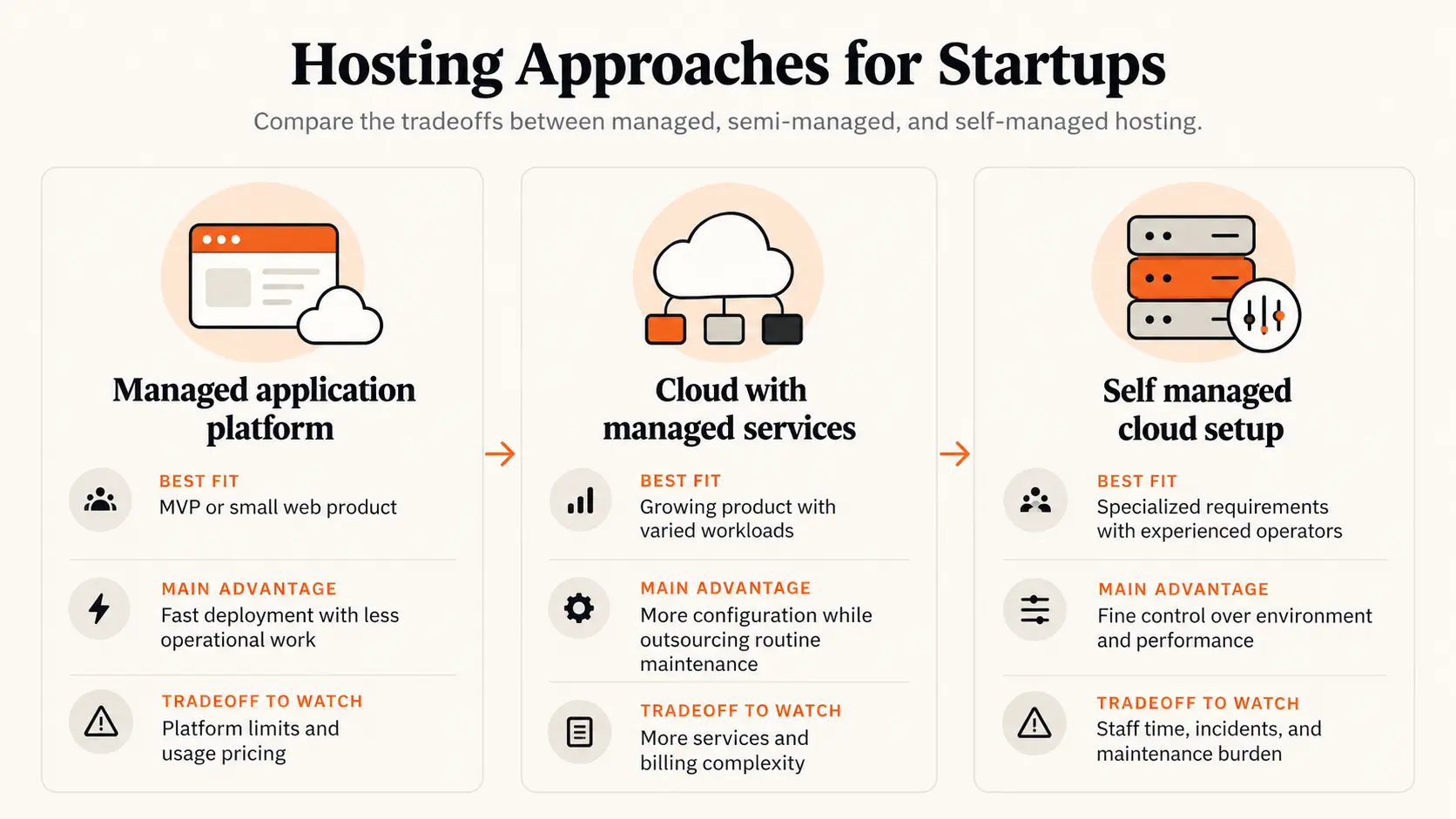
A managed platform can be the right long term choice, not merely a temporary shortcut. Conversely, direct cloud control is justified when the product has specific performance, networking, compliance, or cost requirements that the platform cannot reasonably meet. Cloud provider brands matter less than the ownership model and the team’s operating capacity.
Five Questions Founders Should Answer Before Choosing
1. What does a real customer need to work every day?
Identify the few journeys that cannot fail, such as signing in, paying, or retrieving saved work. Set a realistic reliability target for these journeys rather than paying for perfect availability across everything. A private demo and a live financial product should not carry the same operating budget.
2. Who handles the system at 2 a.m.?
A cheaper virtual machine may become expensive if a founder or engineer must patch it, repair broken deployments, rotate credentials, and respond to outages. Include the time diverted from customer work when comparing hosting options.
3. What actually drives the bill?
Check compute time, database size, data transfers, stored files, background jobs, observability tools, and third party services. A low introductory price can change as traffic or data movement grows. Make sure the team can identify which feature or customer activity caused an increase.
4. What data and security obligations already exist?
Account access, backups, encryption, and recovery matter from the start. Data residency or sector requirements may further constrain the available services. The cloud provider secures its underlying infrastructure, but the startup still owns its configurations, identities, applications, and data handling.
5. How difficult would it be to change the setup?
Prefer services that let the team export data, document configuration, and recover without one employee’s private knowledge. This does not mean avoiding every proprietary tool. It means understanding which dependencies would make a future move costly.
The Real Cloud Cost Is More Than the Monthly Invoice
Suppose a managed platform costs an illustrative $480 a month. A more configurable alternative might have a $260 infrastructure bill, but require eight engineer hours each month for maintenance and monitoring. At an illustrative internal cost of $50 per hour, the second option represents $660 in combined infrastructure and labor cost, before incident response. The numbers are hypothetical and not vendor quotes; actual outcomes depend on usage and team capacity.
The comparison changes as the workload grows. A platform premium may be justified while a team of two validates demand, then become material when usage becomes stable and predictable. Founders should monitor cost per active customer or completed transaction alongside total spend, rather than treating the smallest invoice as the best architecture.
Set budget notifications, assign an owner to review usage, and regularly remove unused databases, test environments, and storage. Alerts notify the team of spending; they do not necessarily stop services or cap the bill. Free credits are useful, but the cost after promotional credits expire should still fit the business model.
A Minimum Viable Production Setup
Start with one deployable application, a managed database where needed, controlled access, monitoring, automated backups, and a tested restore process. Keep production changes deliberate to protect paying customers.
Choose one clear person to receive incident alerts, even if operations are outsourced. Write down how to roll back a failed release and who can access the cloud account if the main engineer is unavailable. This is practical continuity planning, not enterprise bureaucracy.
When Should a Startup Upgrade Its Infrastructure?
Upgrade when evidence shows a business constraint. Repeated slowdowns at normal traffic, outages that threaten retention, cost per transaction rising faster than revenue, or a customer requirement the current platform cannot support are concrete reasons to investigate. Track the affected customer journey before choosing a new technology.
Do not migrate simply because the company raised funding, competitors use containers, or an architecture diagram looks more sophisticated. Migration creates its own downtime risk, engineering cost, and operational work. First check whether better configuration, capacity limits, database indexes, or managed service settings solve the actual problem.
A Practical 30 Day Infrastructure Review
In the first ten days, document the core services, who owns them, the last three months of bills, any incidents, and the recovery plan. Over the next ten days, test backups, review permissions and spending alerts, and identify one change with a measurable outcome. In the final ten days, implement the smallest useful fix and set a date to check whether it improved cost, reliability, or deployment speed.
A good review ends with a decision: keep the current setup, optimize one part, or prepare a scoped migration. It should not end with a wish list of cloud technologies.
Build for the Constraint You Have
For a startup, cloud infrastructure succeeds when customers can rely on the product and the team can afford to operate it. Start with the simplest ownership model that meets real requirements. Add control only when the benefits are measurable and greater than the burden of running it.
FAQ
What is the best cloud infrastructure for a startup?
There is no universal best provider or architecture. For an early web product, managed hosting and a managed database may minimize operational work. More specialized products may justify additional cloud control from the beginning.
Should a startup use AWS, Google Cloud, or Azure?
Choose based on workload requirements, existing team expertise, support needs, location constraints, and total operating cost. Compare the actual services and responsibilities you would use, not just the providers’ headline prices.
When should a startup move away from managed hosting?
Consider a move when measured limitations in performance, compliance, functionality, or economics outweigh migration and maintenance costs. Growth by itself is not sufficient evidence.
How can a startup keep cloud costs predictable?
Track the main cost drivers, configure billing alerts, assign ownership, remove unused resources, and forecast usage beyond promotional credits. Review unit cost as the customer base grows.

Mohsen Avid
Founder & Editor, PinerookMohsen Avid is the founder of Pinerook, covering entrepreneurship, startup strategy, digital business, and the decisions behind building new ventures.
 Seen first.