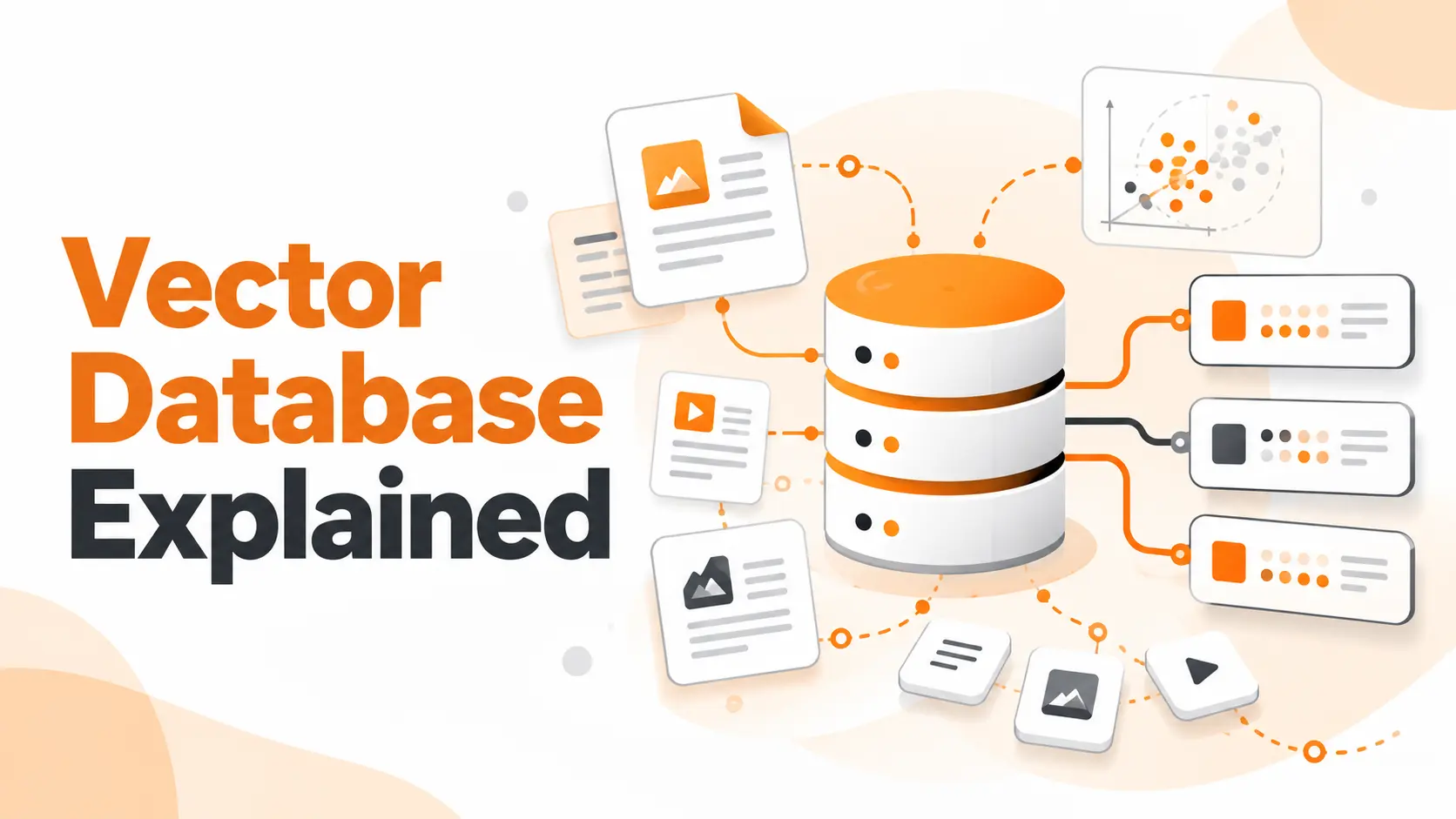
A vector database stores, indexes, and searches numerical representations of data called embeddings. Instead of relying only on exact keyword matches, it helps applications retrieve information based on similarity.
For a SaaS startup, this means customers can find relevant documentation even when their questions use different words from the original articles. The same technology also supports AI-powered recommendations, knowledge retrieval, and semantic search.
I'll explain how vector databases work, how they differ from traditional databases, and what to consider before adding one to an AI application.
How Vector Databases Work
A vector database receives numerical vectors, organizes them for efficient search, and retrieves records that are closest to a query vector.
The important point is that the database doesn't need to understand a sentence as a human would. It compares numerical representations created by an embedding model.
I find it useful to separate the process into four stages.
1. Store Vector Embeddings
An embedding model converts text, images, or other supported content into numerical vectors.
For example, a shortened text embedding might look like this:
[0.21, -0.43, 0.76, 0.18, ...]
This is an illustrative vector, not output from a particular model.
A vector database stores these numbers alongside an identifier and relevant metadata.
For a help-center article, the stored record could contain a document ID, embedding vector, article title, category, and publication date.
The original document can remain in the application's primary database or document storage. The vector record maintains the information needed to locate it.
2. Build a Search Index
Comparing every query against every stored vector becomes increasingly expensive as the dataset grows.
A vector index organizes the data so the database can identify nearby vectors without performing a full comparison against the entire collection.
Different indexing strategies make different trade-offs between search speed, memory consumption, and retrieval quality.
We'll examine those trade-offs shortly.
3. Search for Similar Vectors
When a user submits a question, the application converts that question into a vector using a compatible embedding model.
The database compares the query vector with its indexed vectors and returns the nearest matches.
Common similarity measures include cosine similarity, Euclidean distance, and dot product.
The selected distance metric must be appropriate for the embedding model and its configuration.
A high similarity score indicates proximity under that metric. It does not establish that the retrieved document is factually correct.
4. Retrieve Matching Records
The database returns matching records, document identifiers, metadata, and similarity information according to its query interface.
The application then decides how to use those results.
A search interface can display the relevant documents. An AI assistant can retrieve their content before preparing an answer.
This distinction matters: a vector database retrieves information; it does not independently generate an explanation of that information.
Vector Database Architecture and Indexing
The architecture of a vector database centers on three capabilities: managing vectors, organizing them for search, and applying conditions that determine which records can be returned.
For a production application, I would evaluate these capabilities together rather than treating similarity search as the entire system.
Vector Records and Metadata
A vector represents the numerical features of an item, while metadata describes the item itself.
Consider a support document belonging to a SaaS customer.
Its metadata could contain:
Document ID and source reference
Workspace or customer identifier
Document category
Access permissions
Last update timestamp
These fields support filtering, document retrieval, and access control.
For instance, a search should return relevant documents belonging to the authorized workspace rather than searching unrestricted content from every customer.
A database's ability to combine metadata conditions with vector similarity is therefore central to its usefulness.
Exact Search and Approximate Nearest Neighbor Search
There are two major approaches to finding nearby vectors.
Exact Nearest Neighbor Search calculates distances against the eligible vectors and identifies the actual nearest matches under the selected metric.
It provides exact results but requires more comparison work as the search space grows.
Approximate Nearest Neighbor Search (ANN) uses an index to find close matches without exhaustively comparing every eligible vector.
This reduces search work at the cost of potentially missing some of the true nearest neighbors.
One widely used ANN approach is HNSW, which organizes vectors into a multilayer graph that supports efficient navigation toward nearby points.
Another approach, IVFFlat, partitions vectors into groups and searches selected groups.
These methods have different memory, indexing, and query-performance characteristics.
I would choose between exact and approximate search using the actual dataset and response-time requirements. A small, heavily filtered dataset can perform well with exact search, while a large collection can benefit from ANN indexing.
The key measurement is recall at the required latency, not speed alone.
Metadata Filtering During Search
Metadata filtering narrows the records eligible for retrieval.
Imagine searching a product knowledge base for an article about access permissions.
The database might contain relevant documents from multiple customers, product versions, and subscription plans.
A useful query needs to account for those restrictions while ranking the eligible records by similarity.
Filtering strategies differ across database engines. Some integrate filters into the vector search, while others apply conditions after an approximate index scan.
That difference can affect both latency and the number of relevant results returned.
For applications with strict workspace permissions or detailed product filters, I would test filtered queries before committing to a database.
Vector Database vs Traditional Databases
A common misconception is that vector databases replace SQL databases.
They don't.
Traditional relational databases are designed to manage structured information, relationships, transactions, and precise queries.
Vector search focuses on finding nearby numerical representations according to a similarity metric.
These capabilities solve different problems, but they are not mutually exclusive.
PostgreSQL, for example, supports vector similarity search through the pgvector extension. Google Cloud Spanner and other established database platforms also provide vector-search capabilities.
This means a separate vector database isn't automatically required to build an AI-powered search application.
Structured Queries vs Similarity Search
Suppose a SaaS application stores customer subscription records.
If the application needs to retrieve the exact expiration date of a particular subscription, a structured database query is appropriate.
The application knows which field and record it needs.
Now consider a customer asking:
"Where do I change who can access my projects?"
The answer may appear in documentation titled "Managing Project Permissions."
A semantic search system can retrieve that document based on its relationship to the question.
The distinction isn't that one database understands AI and another doesn't.
It's the type of retrieval the application needs to perform.
Using PostgreSQL with pgvector
If a startup already stores application data in PostgreSQL, I would evaluate pgvector before introducing an additional database service.
The extension supports vector columns, distance operations, exact nearest-neighbor searches, and approximate indexes such as HNSW and IVFFlat.
It also allows vectors and relational records to be managed within the same database.
This reduces the need to synchronize data between separate storage systems.
However, operating vector workloads alongside transactional queries introduces performance and resource considerations.
The decision should be based on query volume, dataset size, indexing requirements, and existing database capacity.
Vector Database Example in a SaaS Application
Consider a fictional startup called DeskFlow that provides project management software.
Its help center contains documentation about workspace settings, subscriptions, project permissions, and external collaborators.
The company wants to improve search so customers can find relevant instructions without knowing the terminology used by the support team.
A customer searches:
"Can contractors access a shared project without joining our company account?"
The relevant help article is titled:
"Guest Access and External Collaborators"
A keyword-based system may not rank the article highly if it relies heavily on exact terminology.
A vector-based search system can compare the semantic relationship between the question and the document.
Preparing the Knowledge Base
DeskFlow first processes its help articles and generates embeddings for the searchable sections.
The database stores the vectors alongside source identifiers and metadata.
For this example, I would preserve the document title, product version, workspace visibility, and source reference.
These details matter because a relevant document is not useful if it describes an outdated feature or belongs to a different customer.
Retrieving the Relevant Article
When the customer submits the question, the application generates its query embedding.
The database searches for nearby vectors while applying the required metadata and access filters.
It returns the strongest matching candidates.
The application can then open the corresponding articles and display the relevant sections.
For this example, "Guest Access and External Collaborators" is the intended result.
The ranking still needs to be verified with the selected embedding model and actual search data.
Maintaining Reliable Search Results
The result should not be accepted simply because it has the highest similarity score.
A database always has a nearest candidate within a nonempty eligible collection, even when none of the candidates answers the question.
I would add relevance checks and a clear response for searches where the available evidence is insufficient.
For product documentation, source versions and permissions also need to remain accurate as articles are revised or removed.
The objective is to return a useful, authorized document rather than merely the closest numerical match.
Vector Database Use Cases Beyond Semantic Search
The same retrieval mechanism supports several product features beyond help-center search.
AI Knowledge Assistants
A vector database can serve as a retrieval layer in Retrieval Augmented Generation.
In this architecture, the application retrieves relevant content from its knowledge sources and passes that content to a language model.
The model then generates a response using the supplied information.
The vector database handles retrieval, while the language model handles response generation.
This separation allows an application to update its searchable knowledge without retraining the language model.
Product and Content Recommendations
An application can represent products or articles as embeddings and retrieve items with related features.
For a publishing platform, this could support recommendations based on article topics rather than matching categories alone.
For an e-commerce application, embeddings can help identify products with similar descriptions or visual characteristics.
The final ranking can combine vector similarity with other product requirements, including availability, recency, and user preferences.
Customer Feedback Grouping
Startups collect feedback through surveys, support conversations, and feature requests.
A vector database can help retrieve feedback items that discuss related issues.
For example, comments about inviting teammates, managing permissions, and controlling workspace access can be discovered through semantic similarity.
A product team can then examine those groups to identify recurring requests.
This makes vector search useful for internal research as well as customer-facing applications.
Popular Vector Database Technologies
Several established technologies provide vector storage and similarity search.
The differences are not limited to which indexing algorithm they support. Deployment options, filtering, data management, and integration with existing infrastructure also influence the decision.
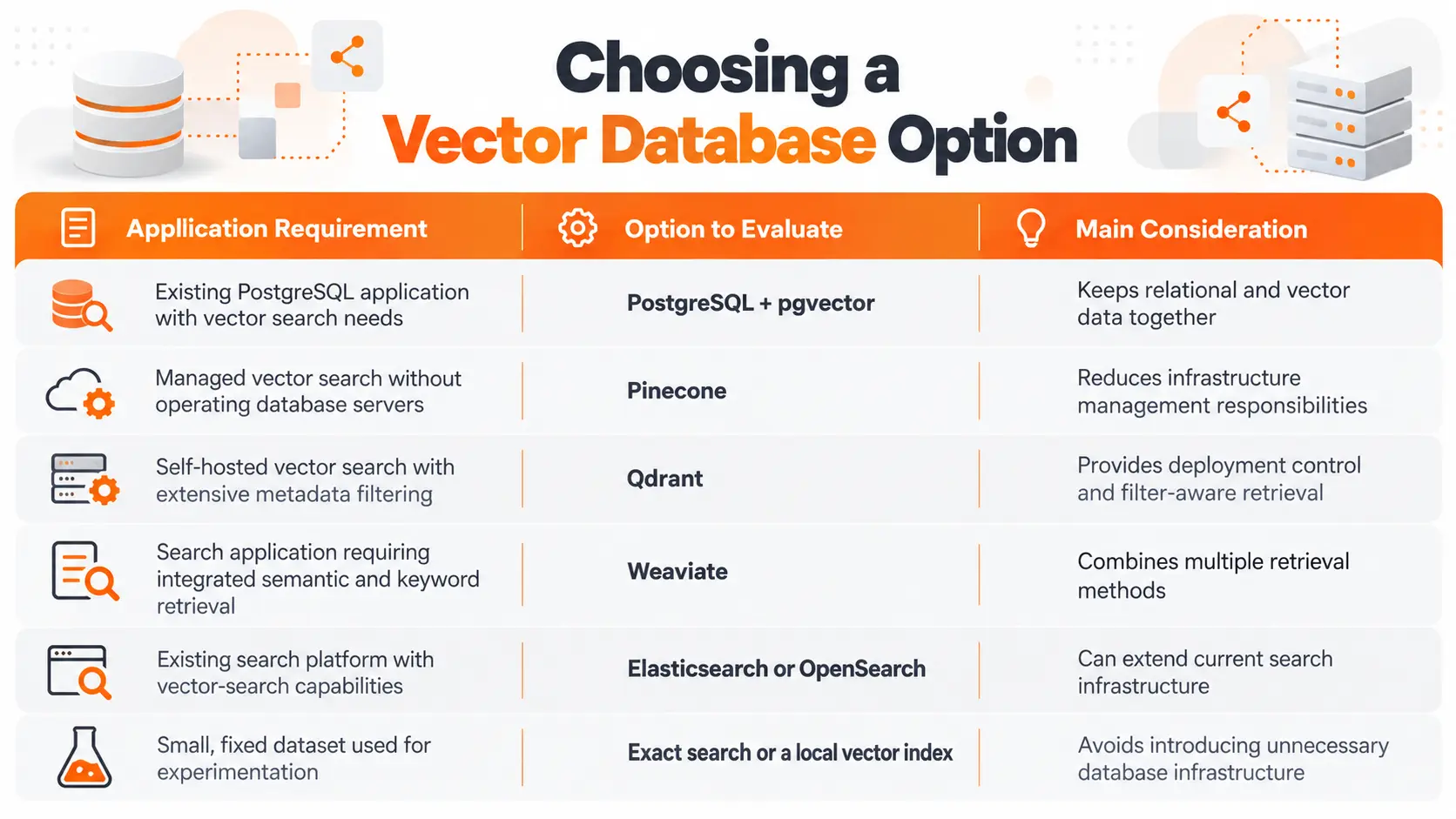
Pinecone
Pinecone provides a managed vector database service.
It supports vector indexing, similarity search, metadata filtering, and operational features for managed deployments.
For a startup that doesn't want to operate database infrastructure, I would include Pinecone in the evaluation.
The trade-off is depending on an external managed service and its pricing, service limits, and supported deployment locations.
Qdrant
Qdrant is a vector search engine available through self-hosted and managed deployment options.
It supports vector similarity search, payload filtering, and indexing features designed for filtered retrieval.
I would evaluate Qdrant when a product requires flexible metadata filtering or when the team wants control over its deployment environment.
Its performance still needs to be tested under the application's actual filtering conditions.
Weaviate
Weaviate provides vector search alongside keyword search, hybrid retrieval, filtering, and integration options for embedding and AI models.
It offers both self-managed and cloud deployment options.
For a search-oriented application that needs semantic and lexical retrieval within one platform, Weaviate is worth evaluating.
PostgreSQL with pgvector
PostgreSQL with pgvector adds vector similarity search to an established relational database.
Its main advantage for an existing PostgreSQL application is architectural simplicity: structured records and vector data can remain in the same database.
I would compare this option with dedicated services before adding a separate system.
There is no universal winner among these technologies. The relevant differences become clear when measured against a defined workload.
Choosing the Right Vector Database
For a startup, I would begin with the infrastructure already in place, the expected query patterns, and the team's ability to maintain another service.
This table provides a practical starting point.
I wouldn't choose a product based on an arbitrary threshold such as one million vectors.
Vector dimensions, filtering requirements, concurrent queries, hardware, and indexing configuration all affect the result.
A useful comparison requires the same dataset, embedding model, query set, and relevance expectations across the candidate systems.
Vector Search Performance and Operating Costs
A successful prototype establishes that vector search works. It doesn't establish whether the implementation will remain efficient as the product grows.
I would evaluate three measurements before making a production decision.
Retrieval Latency
Latency measures how long the search request takes to return results.
For customer-facing applications, response time affects the overall product experience.
I would measure latency under realistic concurrency and metadata filters rather than relying on an isolated benchmark.
The distance metric, index configuration, hardware, and number of eligible records all influence query performance.
Retrieval Recall
Recall measures whether the search returns the relevant items it is expected to find.
When evaluating approximate indexes, recall can also measure how many true nearest neighbors appear in the returned result set.
Increasing search speed is not useful if the index consistently misses the documents customers need.
I would test both latency and recall using the same collection of representative queries.
For a support application, those queries should include synonyms, exact product identifiers, account-permission questions, and ambiguous terminology.
Storage and Infrastructure Costs
The operating cost extends beyond storing numerical vectors.
Index structures, metadata, replicas, compute resources, backups, and network usage can all contribute to the total expense.
A managed service also introduces a different cost structure from self-hosted infrastructure.
For a startup, I would estimate the monthly expense using the expected number of vectors, query volume, update frequency, and availability requirements.
That provides a more useful comparison than looking only at entry-level pricing.
Data Security and Multi-Tenant Search
For a SaaS application serving multiple companies, search relevance and data authorization must be handled together.
A vector database can return a highly relevant document that the requesting user is not allowed to access.
Semantic similarity does not establish permission.
Tenant Isolation
Suppose DeskFlow stores support content for Company A and Company B.
A user from Company A asks about a private project.
The retrieval system must restrict its search to records the user is authorized to access.
I would enforce these restrictions using verified user identity, application-level authorization, and appropriate database filtering or tenant isolation.
A workspace identifier supplied directly by an untrusted client should never serve as the sole proof of access.
Where stronger isolation is required, the architecture can use separate collections, partitions, or deployment boundaries according to the database's capabilities.
Document Permissions
Permissions can differ even within one company.
For example, a finance document may be available to administrators but not to every employee.
The retrieval layer must respect those permissions before returning document content to an application or language model.
Metadata filters can participate in this design, but the application remains responsible for enforcing authorization correctly.
Source Updates and Data Consistency
A document's embedding represents the content processed at the time it was created.
If the underlying article changes, its stored representation needs to be updated through the application's indexing process.
I would establish a clear relationship between the original document, its vector records, and its current version.
This allows the system to replace outdated vectors and prevent obsolete information from remaining available in search results.
Consistency guarantees and update visibility differ between database products and deployment configurations, so they must be verified during implementation.
Final Thoughts
A vector database provides a way to store, organize, and search numerical representations of information.
Its value comes from retrieving related content efficiently, not from replacing every existing database or making an AI application intelligent on its own.
For a startup building semantic search or an AI knowledge assistant, I would first verify the retrieval requirements and examine whether the current database infrastructure can meet them.
If the workload requires specialized indexing, extensive filtering, independent scaling, or managed vector-search operations, a dedicated solution becomes worth evaluating.
The strongest choice is the one that retrieves the right information, respects access permissions, and meets the product's performance requirements without unnecessary infrastructure.
FAQ
Can I change my embedding model later without rebuilding everything?
A new embedding model can produce vectors with different dimensions and a different representation space. Existing vectors cannot be assumed compatible with those generated by the replacement model. A controlled migration should regenerate document embeddings, create a compatible index, validate retrieval quality, and switch queries to the new representation.
Can a vector database search images and audio too?
Yes. A vector database can store embeddings generated from images, audio, and other supported data types. The embedding model determines which types of content can be represented and compared. Cross-modal search requires a model or architecture that places the relevant modalities into compatible representation spaces.
Are my stored vectors encrypted automatically?
Encryption depends on the database product, deployment environment, and security configuration. Managed services and self-hosted deployments do not all provide identical defaults. Before storing sensitive data, verify encryption at rest, transport security, key management, authentication, and backup protection. Embeddings should not be treated as anonymous data.
Can I move my embeddings from one vector database to another?
Yes, provided the source system allows the required data to be exported and the destination supports the vector format and dimensions. The migration must also preserve identifiers, metadata, and relevant source references. Indexes and database-specific query configurations need to be recreated and tested in the destination system.
If I delete a document, does its embedding disappear too?
Not automatically in every architecture. Deleting a document from the primary storage system does not guarantee deletion of corresponding vectors in a separate database. The application must propagate deletion operations and verify that associated records are removed from active retrieval indexes. Backup retention and cached copies require separate handling under the applicable data-retention policy.

Fatemeh Jahangard
Technology & AI Writer at PinerookFatemeh Jahangard covers AI, emerging technologies, and digital innovation for Pinerook, focusing on how technology shapes startups and industries.
 Seen first.