AI assessment tools help educators create tests, grade assignments, and deliver feedback without spending hours on repetitive work. CoGrader is a strong choice for written assignments, Gradescope supports grading large sets of exams, while Edcafe AI and Wayground make quiz creation and student assessment more accessible.
The important difference is what happens after students submit their work. Some platforms simply calculate scores, while others help teachers understand student performance and provide meaningful feedback. Choosing the right tool starts with knowing which part of assessment needs improvement.
Best AI Assessment Tools for Educators
The following seven platforms address different assessment needs. Our comparison focuses on their documented capabilities, practical limitations, and suitability for teachers rather than the number of AI features each platform advertises.
1. CoGrader: Best for Essay Grading and Written Feedback
CoGrader focuses on evaluating written assignments against a teacher's grading rubric.
Educators can upload student work, provide assessment criteria, and receive suggested scores with feedback explaining how each submission meets those criteria.
What makes CoGrader useful is its focus on a complete grading workflow. Teachers can review and adjust the suggested grades before finalizing results.
It also supports handwritten assignments and connections with classroom platforms.
Best suited for: Teachers handling large volumes of essays, written responses, and assignments requiring individual feedback.
Main limitation: CoGrader is primarily designed for written assessment rather than building interactive quizzes or delivering classroom activities.
2. Gradescope: Best for University Exams and Large Classes
Gradescope, developed by Turnitin, is particularly relevant to universities managing substantial volumes of student submissions.
It supports paper exams, online assignments, programming assessments, and structured grading with rubrics.
Its AI assisted grading feature identifies groups of similar answers in supported fixed template PDF assignments. Instructors can then review those groups and apply consistent grading decisions.
This approach is useful when hundreds of students answer the same examination questions.
A distinction worth understanding is that Gradescope does not provide AI grouping for every assignment format. Its AI grouping feature requires eligible institutional access and supported assessment types.
Best suited for: University lecturers managing large examinations and structured written responses.
Main limitation: AI assisted answer grouping is restricted to supported fixed template assignments.
3. Edcafe AI: Best for Quiz Creation and Assessment Delivery
Edcafe AI combines question generation, student assessment, and feedback in one platform.
Teachers can create quizzes from educational content, assign them to students, and review their results.
Its quiz activities support different assessment experiences. Students can practise with feedback during an activity or complete an assessment before receiving their results.
Edcafe also includes an Assignment Grader that evaluates written submissions against provided rubrics.
We see its main advantage in the connection between creating an assessment and delivering it. Teachers do not need to rely on a separate question generator before moving everything into another platform.
Best suited for: Educators who want to create quizzes, assess students, and review performance in one environment.
Main limitation: Free access includes participation and activity limits, making class size an important consideration.
4. Formative: Best for Monitoring Student Understanding
Formative is designed around collecting student responses and using them to guide teaching.
Teachers can build assessments containing different question types, assign activities, and examine responses as students work.
Its Luna AI assistant supports assessment creation, question development, and feedback features.
For example, an educator teaching mathematics can assign a short assessment and examine which concepts students have understood before planning the next lesson.
This makes Formative particularly useful for formative assessment, where the purpose is to identify learning gaps before the final examination.
Best suited for: Teachers who want to monitor understanding, adapt lessons, and provide feedback during learning.
Main limitation: Advanced question types, rubric features, and certain AI capabilities require paid access.
5. Wayground: Best for Interactive Classroom Assessments
Wayground, formerly Quizizz, combines interactive assessments with AI question generation.
Teachers can create questions from documents, written instructions, websites, and videos. They can then edit those questions before assigning an activity.
Students participate in interactive quizzes while teachers review assessment results.
Its strength is making short assessments part of classroom instruction rather than treating every test as a formal examination.
For a teacher checking whether students understood a lesson, Wayground provides a practical alternative to preparing and marking a separate worksheet.
Best suited for: Interactive quizzes, classroom participation, knowledge checks, and student practice.
Main limitation: The free plan restricts access to certain question types, activities, and advanced features.
6. MagicSchool AI: Best for Assessment Planning and Teacher Workflows
MagicSchool offers a broad collection of AI tools designed for educators.
Its assessment features include MagicQuizzes and Class Writing Feedback, alongside tools for generating questions and preparing teaching materials.
Rather than functioning exclusively as an AI grading platform, MagicSchool connects assessment preparation with other teaching activities.
For educators who already use AI to create lesson materials, this can reduce the need to switch between several applications.
However, it is important to distinguish generating assessment content from evaluating completed student work. The two tasks require different levels of accuracy and oversight.
Best suited for: Teachers seeking assessment support alongside lesson planning and other educational tasks.
Main limitation: Access to advanced functions and usage allowances varies by subscription.
7. Brisk Teaching: Best for Feedback Inside Existing Documents
Brisk Teaching takes a different approach to AI assessment.
Instead of requiring teachers to move their entire workflow into a separate platform, Brisk works with existing educational content and classroom tools.
Its feedback features help educators review written work and generate comments aligned with grading rubrics.
It supports work across environments including Google Docs and major classroom platforms.
We would favor Brisk when the objective is improving the quality and speed of written feedback without replacing an established teaching workflow.
Best suited for: Teachers reviewing student writing and providing feedback within existing documents.
Main limitation: Its core strength is feedback support, not a complete examination management system.
AI Assessment Tools Comparison
The most useful comparison is not which platform offers the largest number of features. It is which platform handles the assessment task you need to complete.
The following table summarizes the primary use of each tool, its free access, and the relevant paid options as listed in November 2026.
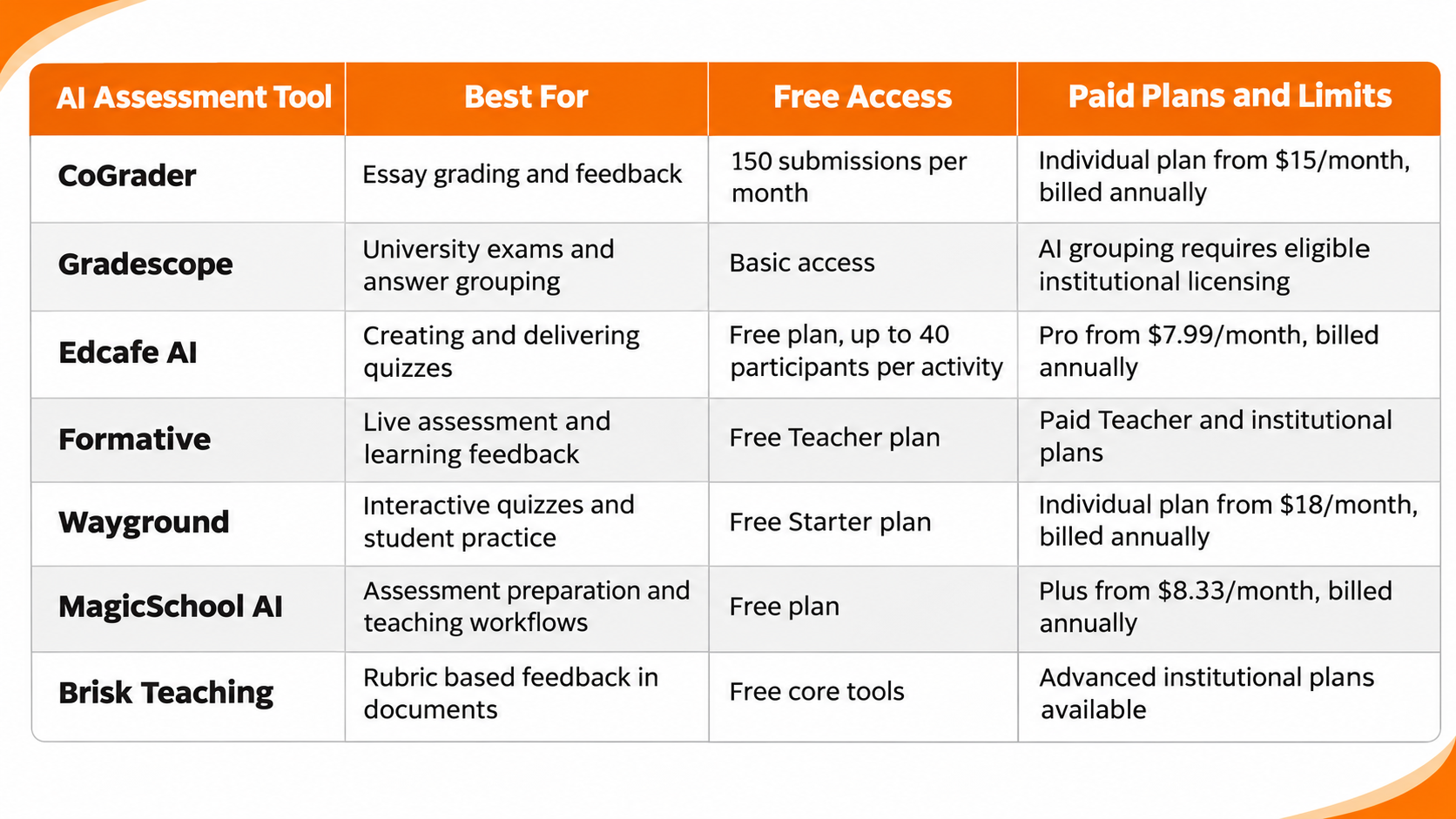
These prices represent the advertised starting points rather than the total cost of every available feature. Institutional licensing, student capacity, and access to advanced AI functions can change the amount a school pays.
A free plan is valuable for evaluating an interface, but selecting software for regular teaching requires checking whether it supports the actual number of submissions and students involved.
AI Assessment Tools for Different Assessment Types
An AI quiz generator and an AI grading tool solve different educational problems. Treating them as interchangeable leads to unnecessary complexity.
Formative Assessment
Formative assessment measures student understanding during the learning process.
Formative and Wayground are useful choices for collecting responses, identifying knowledge gaps, and adjusting instruction.
We favor tools that make individual responses visible, rather than showing only a class average. A percentage score tells the teacher how many answers were correct. The actual responses help explain what students misunderstood.
Summative Assessment
Summative assessment evaluates achievement at the end of a learning period.
Gradescope is better suited to managing large structured examinations, while CoGrader focuses on evaluating written submissions against rubrics.
In both cases, the instructor needs to maintain control of grading decisions and ensure that assessment criteria remain consistent.
Written Feedback and Revision
For assignments where improvement matters more than assigning a final score, Brisk Teaching and CoGrader offer targeted feedback features.
The useful distinction is whether the tool explains what needs revision.
A comment identifying weak evidence in an argument provides more educational value than a general statement that the essay needs improvement.
Accuracy of AI Grading Tools
Automated scoring deserves closer scrutiny than question generation because the result directly affects how student performance is judged.
Research from the University of Cambridge published in 2026 examined AI grading across more than 750 university essays. The researchers found that the systems were sensitive to linguistic characteristics such as vocabulary complexity, sentence structure, and essay length.
These characteristics do not necessarily reflect the quality of a student's understanding.
The finding matters when assessing sophisticated written work. An essay can demonstrate strong reasoning through simple language, while another can sound impressive without presenting a convincing argument.
We would therefore evaluate an AI grading tool using an existing set of assignments that educators have already assessed.
The comparison should examine agreement with the rubric, differences in awarded marks, and the quality of feedback on individual criteria.
For consequential academic assessment, teachers should retain responsibility for the final grade.
This does not remove the value of automated grading. It establishes the difference between using AI to support an evaluation and allowing it to determine the outcome independently.
Choosing the Right AI Assessment Software
Selecting AI assessment software becomes easier when the evaluation is based on an actual classroom task.
We recommend preparing a sample assessment before committing to a subscription.
For a writing class, the sample should include essays representing different performance levels. For a mathematics course, it should contain the question types students encounter in real examinations.
The educator can then evaluate three practical outcomes.
Assessment quality: The generated questions and suggested grades must match the learning objectives and grading criteria.
Teacher control: Instructors must be able to correct questions, adjust feedback, and revise grading decisions.
Time saved: The system should reduce the total time required to complete the assessment, including reviewing and correcting its output.
A tool that produces results quickly but requires extensive correction offers little practical advantage.
For institutions, another consideration is whether the software fits existing teaching systems. Integration requirements and student data policies should be reviewed before introducing a platform across multiple courses.
Student Data Privacy and Assessment Responsibility
Educational assessment involves identifiable student work, grades, and information about academic performance.
Before uploading assignments to AI assessment platforms, schools should verify the provider's data retention, access controls, and contractual privacy protections.
Institutions also need to establish who can access generated feedback and how students can request a review of their grades.
This is especially important when automated systems influence formal assessment outcomes.
Within AI in Education, the quality of assessment depends on more than technological efficiency. It also depends on protecting student information and ensuring that educational decisions remain accountable.
Final Assessment
The best AI assessment tools are those that address a clearly defined teaching need.
CoGrader and Gradescope stand out for different grading workflows. Edcafe AI and Wayground are practical choices for creating and delivering quizzes. Formative supports ongoing assessment, while MagicSchool and Brisk help teachers prepare assessments and provide feedback.
We would choose based on the type of student work, the need for human review, and the limitations of each plan rather than selecting the platform with the longest feature list.
FAQ
Can I turn my old Google Forms quizzes into AI assessments?
Formative supports importing Google Forms, including within its Free Teacher plan, subject to monthly document import limits. After importing, educators should review question formats, correct answers, and scoring rules before assigning the assessment.
Do my students need to create an account to take an AI quiz?
This depends on the platform and how the assessment is shared. Edcafe AI supports student participation without requiring individual student accounts. Other systems use class codes, learning platform accounts, or institutional access arrangements.
Can these tools grade handwritten math homework?
Gradescope supports assessment workflows involving handwritten mathematical notation. Its AI answer grouping is restricted to supported fixed template assignments. Teachers should confirm that the specific question type is compatible before expecting automated assistance.
Can I move my students' grades if I switch platforms?
Gradescope supports exporting grades for use in other systems, while Formative offers response data exports. Before changing platforms, institutions should check which records can be exported, the available formats, and whether historical feedback is included.
Can I create the same assessment in different languages?
Wayground AI supports selecting a language when generating assessments. Teachers should verify translated terminology, answer choices, and scoring criteria before using the assessment with multilingual students.

Fatemeh Jahangard
Technology & AI Writer at PinerookFatemeh Jahangard covers AI, emerging technologies, and digital innovation for Pinerook, focusing on how technology shapes startups and industries.
 Seen first.